
Got Questions?
Login Issues?
What is BBID?
A Blackbaud ID (BBID) is created for you when you apply at Cambridge. This BBID can be used for single-sign on for all your Blackbaud portals such as Blackbaud Education Management and Blackbaud Tuition Management.
Your BBID consists of your email address and password. If you need to change the email address associated with your BBID, contact school administration.
What if I forgot my Password?
Visit https://app.blackbaud.com/signin/forgot-password and select Continue with Email.
Enter your email address associated with your Blackbaud ID, then select Continue.
Select Forgot password, then follow the prompts to send a confirmation code to your email address.
Check your email inbox to obtain the confirmation code. If you don't receive the confirmation code email, check your Junk or Spam folder.
Enter your confirmation code and select Confirm.
Enter and re-enter your new password. Then select Continue.
If you sign in through Apple or Google, change your password through Apple or Google directly.

What about Tuition Management?
When signing into Blackbaud Tuition Management, the portal used for paying and viewing tuition and fees, you can use your existing BBID. If you have more than one Tuition Management Family ID account, signing in with your BBID also provides the ability to access all of your Family ID accounts using one login!
If you sign in with your Blackbaud Tuition Management username and your BBID is not yet linked to a Tuition Management account, you will be asked to enter your Tuition Management username and password before you can connect the account to a BBID. Once your accounts are linked and you'll sign in with your BBID moving forward.
If your BBID is already linked to your Blackbaud Tuition Management account, you will be automatically prompted to login using your linked BBID credentials.
One easy way to access Tuition Management is by logging in to Blackbaud Education Management, navigating to the RESOURCE tab, then finding the Tuition Management tile. Otherwise, you can visit Tuition Management directly.
How do I Sign an Enrollment Contract?
1. Login at cambridgedallas.myschoolapp.com.
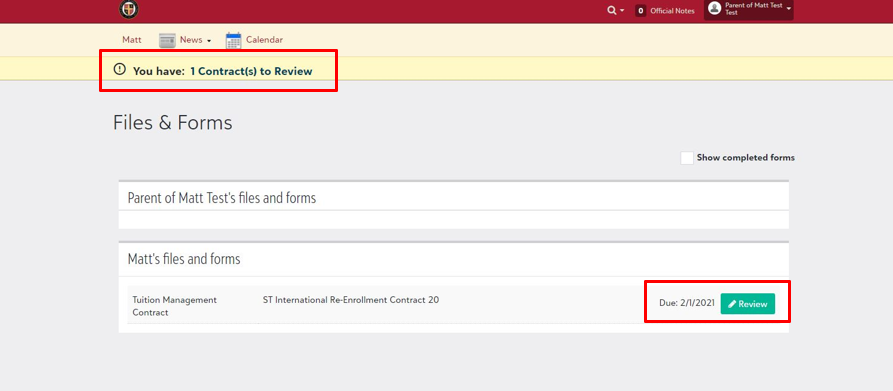
2. Once logged in, you should see your contract is ready for review at the top of your screen.
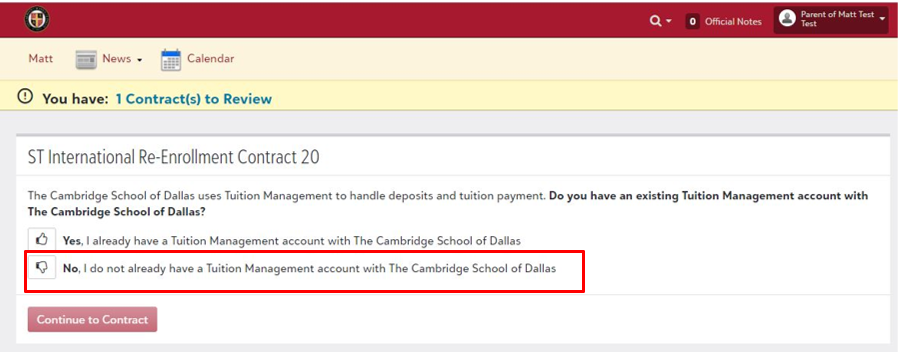
3. Select “No” when prompted regarding a Tuition Management account.
4. Follow the tabs along the contract and complete all steps.
5. At the deposit screen, ensure you select a payment method for your deposit.
Ensure signature on contract to submit properly. If the contract is submitted properly, you should be automatically enrolled into your Tuition Management account for paying all school tuition and fees.
Blackbaud Tuition Management FAQs
Are You Hearing From Us?
Add These Email Addresses to Your Safe-Sender List:
cambridgedallas@myschoolapp.com
cambridgedallas@myschoolemails.com
cambridge@cambridgedallas.org
customerservicemessages@blackbaud.school
customerservice@blackbaud.school
noreply@notification.blackbaud.com
The school uses several methods to communicate with families, including text and email notifications through Blackbaud.
Did you know you can be informed via text and email if your student’s athletic game or practice is canceled or rescheduled?
Make sure you are hearing from us and getting the notifications you need by updating your settings today!
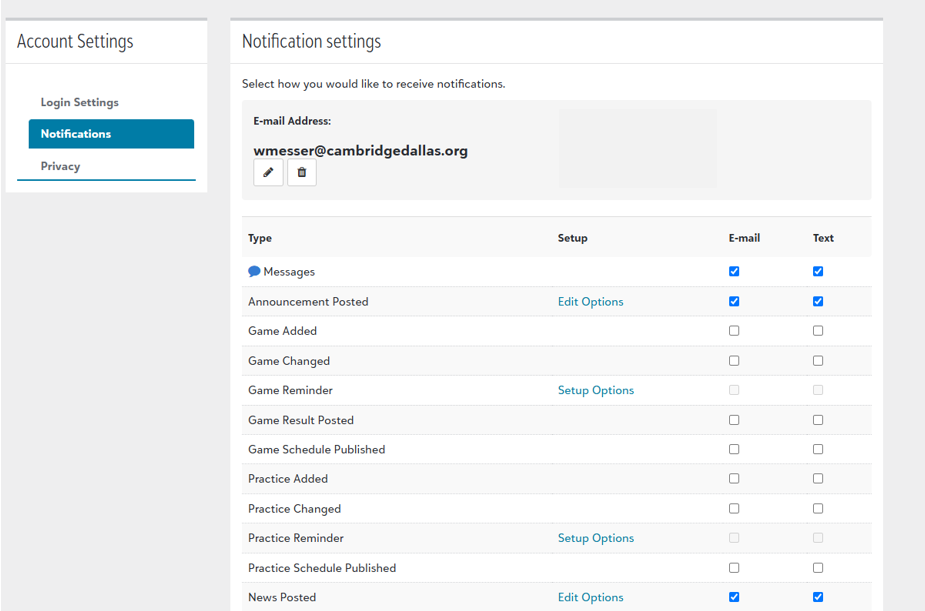
Log-In to Blackbaud Education Management.
Visit your profile (top right corner - settings).
Select text and email notification settings.
Select the checkboxes next to the categories you want. “News Posted” and “Announcements Posted” are frequently used to share information with your family! If you’d like to be informed of your student’s game and practice schedule changes, select those, as well.
-
Your Family ID is a 13-digit, account-specific identification number for every school-specific account, which is updated annually each school year. It can be found on any written communication sent from Blackbaud Tuition Management or on your online account. Please be sure to include your Family ID on any payments sent to Blackbaud Tuition Management to ensure they are applied to the appropriate account.
-
• Make a Payment
• Stop/Resume automatic debit payments
• Review payment history
• Change/edit your payment information
• Update your personal information
• View and print invoices (if you are not on automatic debit), Family Tuition Statements, and Year End Statements for tax purposes
• See an itemized breakdown of tuition, fees, and discounts billed to your account
-
Log in to your online account and select My Profile at the top of your screen. Select Update and choose the section you wish to change from the drop-down options.
-
Only parents or responsible parties who are named on the account will be provided any specific information about the account for security purposes. If you are the primary account holder and wish to add, change, or update the secondary account holder, please contact school administration.
-
Your total due may change month to month due to fees, discounts, and adjustments that have been made by the school.
-
Contact the Chief Operations Officer at wmesser@cambridgedallas.org or call the front desk at 214-357-2995.
-
Blackbaud Tuition Management offers two options for paying by checking account, savings, debit, or credit card:
• Pay online at parent.blackbaud.school
• Pay over the phone through the automated system or with a live representative at (888) 868-8828
Payments made by phone and web are posted the same day they are received.
-
Depending on your state and school policy, Blackbaud Tuition Management can accept VISA™, MasterCard™, American Express™ and Discover™ credit and debit cards. Please note that a credit/debit card usage fee may apply. You can use your credit card to make monthly recurring payments. VISA Checkout™ virtual wallet is also available.
-
A 2.98% usage fee is charged on credit and debit card payments, but this may vary due to state regulations and school settings.
-
You can schedule automatic payments from your bank account or credit/debit card by logging into your account and selecting My Profile at the top of your screen. Open the Payment Information tab and select Update to enter your information. You must complete all 3 steps to initiate automatic payments.
If your automatic payment is set up fewer than 3 business days before your due date, your first payment may not be pulled automatically. In this case, you will still be responsible to make a manual payment before your due date. Please read the terms and conditions carefully as fees may apply.
-
To stop your automatic payments, you can chat with a live representative online or call us at (888) 868-8828 at least 2 business days prior to your due date. Payments are unable to be stopped fewer than 2 business days prior to your due date as it will go into process 1 business day prior to ensure the funds are available to be applied to your account by your due date.
-
You can always pay via check directly to the school. If you would like to pay Blackbaud directly, follow the instructions below.
If you would like to use your checking account to pay, you can do this by making a one-time payment online, by calling in a payment through the automated system or with a live representative, by setting up automatic monthly payments directly from your checking or savings account, or by mailing a check or money order. Checks or money orders should be mailed to the closest payment processing center listed below. If you live east of the Mississippi River, please use the first mailing address in Newark, New Jersey. If you live west of the Mississippi River, please use the second mailing address in Los Angeles, California.
If you would like to mail a payment overnight, please send it to one of the addresses listed for overnight packages. Please include your Family ID on your check or money order to ensure it will be applied to the appropriate account.
West of the Mississippi
Blackbaud Tuition Management
PO Box 54228
Los Angeles, CA 90054-0228
Overnight packages (West of the Mississippi)
Exela Technology
C/O Blackbaud Tuition Management
20500 Belshaw Ave.
Carson, CA 90746
-
Yes! Either have them send it to the school directly at the address below or follow the check payment instructions above.
The Cambridge School of Dallas
P.O. Box 59895
Dallas, TX 75229
-
• Please include your 13-digit Family ID in the memo section of the check or money order (a payment stub is not necessary).
• Do not include any additional paperwork with the payment (letters, Post-it notes, staples, paperclips, etc.). Additional items will delay the processing of your payment.
• Please send payments 7-10 days before your due date. If there is a holiday, please add 3-4 days.
• If there are fewer than 7-10 days before your due date, please consider paying via our website at parent.blackbaud.school. You can also use our automated telephone service to make a payment. Both these solutions eliminate delays in processing your payment. You can pay online or over the phone using your checking or savings account.
• Make checks payable to Blackbaud Tuition Management.
• Blackbaud Tuition Management does accept some online bill payments electronically. However, some banks will still send payments as a physical paper check through the USPS mail. If you have any questions about whether your payment will be sent electronically by your bank, please contact your bank directly.
• Once a payment has been sent by physical paper check, it cannot be stopped. If you decide to stop the payment with your bank, a failed bank fee will be incurred on your Blackbaud Tuition Management account.
• If you plan to use your bank’s online bill payment service, please include your 13-digit Family ID without letters, spaces, or characters.
-
Wiring instructions can be found below. Please provide this payment information to your financial institution based on their location.
Banks within the USA send to:
Receiving bank name:
Fifth Third Bank
Receiving Bank Address:
38 Fountain Square Plaza
Cincinnati, OH 45263
ABA/Routing number:
042000314
Beneficiary Name:
Smart LLC
Beneficiary Address:
65 Fairchild Street
Charleston, SC 29492
Banks from outside the USA send to:
SWIFT/BIC:
FTBCUS3C
Fed routing number:
042000314
Bank Name:
Fifth Third Bank
Beneficiary Account Number:
SMT0402670
Beneficiary Account Name:
Smart LLC
Please include the FAMILY ID NUMBER with each wire.
A $15.00 fee is charged for each wire sent to Blackbaud Tuition Management. Please add $15.00 with your tuition payment to cover the bank fees associated with accepting wire transfers. Additionally, please check with your financial institution for any additional fees that they may charge you. You may also incur additional fees from your bank or an intermediary bank that partners with your bank. It is best to speak directly with your bank regarding their wire fees.
-
In compliance with NACHA regulations, all payments made with a new bank account must go through a validation process to ensure the account information is accurate, the account is open, active, and able to receive ACH transactions. Payments will display as "On Hold" during the validation period, which typically takes 4 business days. Once validation is successful, the payment will be processed. If validation fails, you will be notified via email or text message.
-
Payments are due on or before your due date. If your payment is not made by your due date, or you are carrying an outstanding balance, a Follow Up Service Fee may apply. Blackbaud Tuition Management will remind you of your upcoming payment to help you pay on time. We will also advise you when you have missed a payment to help you avoid any future fees. Additional late fees may apply depending on your school’s policy.
-
A fee may be applied to your account for any failed payment processed via auto-debit, phone, or web. Your bank may also impose additional fees.
-
1. Sign into your account at parent.blackbaud.school.
2. Select the Session Year.
3. Under Related Links, select Family Year End Statement or Student Year End Statement.
-
Our Parent Contact Center is available to help you through our online chat feature available upon logging into your account or by phone at (888) 868-8828. You can access your account to check balances and make payments online 24 hours a day.